An element places a fuselage profile (<profileUID>) in the section coordinate system. The transformation of the element defines the element coordinate system within the section, and the profile, defined in the y-z plane (profileGeometryType), lies in this coordinate system. A scaling in y and z gives the width and the height; the superellipse of a standard profile, for example, is 1 wide and 1 high (standardProfileType), so that a scaling of 2 in y and 1.75 in z turns the circle into an ellipse 2 m wide and 1.75 m high. A translation moves the profile within the section, e.g. upwards towards the tail.
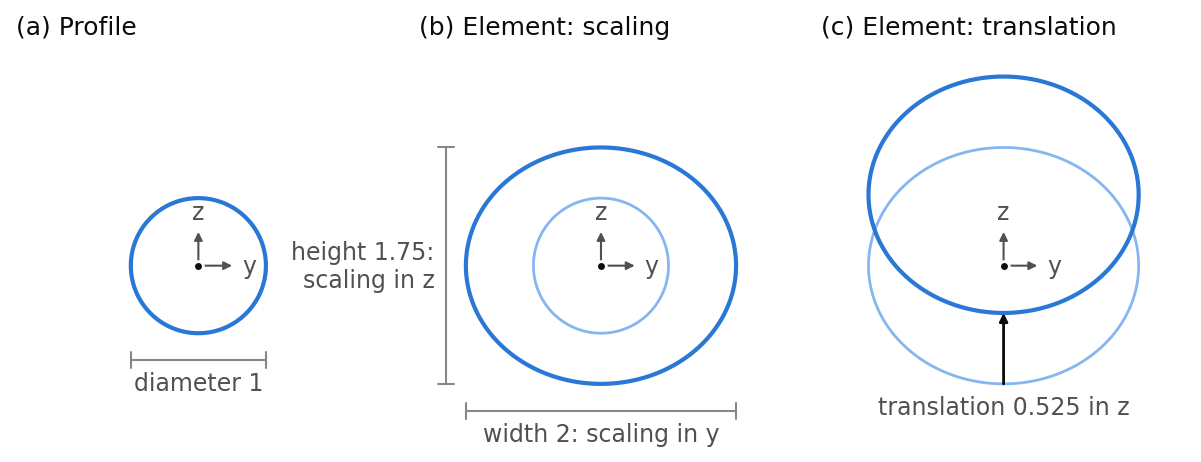
The figure shows the steps for the element of a tail section of the example in fuselageType: the profile (a), a circle of diameter 1, is scaled to a width of 2 and a height of 1.75 (b) and translated upwards by 0.525 (c). The pale contours show the profile before each step. How the section in turn is placed in the fuselage is described in fuselageSectionType.
A pointed nose or tail is an element with a scaling of 0 in y and z: its profile shrinks to a point, at which the surface closes. The nose of the example is such an element.
Segments start and end at elements, not at sections (fuselageSegmentType).
Several elements in a section
A section can hold several elements with different profiles or transformations. They allow a step in the surface at the section: one segment ends at the first element, and the next segment starts at the second element.
Example
The element of the tail section at x = 24 m of the fuselage shown in fuselageType, scaling the circle to a width of 2 m and a height of 1.75 m and moving it upwards by 0.525 m:
<elements>
    <element uID="Fuselage_tail2_element">
        <name>Tail 2 element</name>
        <profileUID>Circle</profileUID>
        <transformation>
            <rotation>
                <x>0</x>
                <y>0</y>
                <z>0</z>
            </rotation>
            <scaling>
                <x>1</x>
                <y>2</y>
                <z>1.75</z>
            </scaling>
            <translation>
                <x>0</x>
                <y>0</y>
                <z>0.525</z>
            </translation>
        </transformation>
    </element>
</elements>