The Common Parametric Aircraft Configuration Schema (CPACS) is an XML-based data format for describing aircraft, rotorcraft and their missions, together with the data of their design and analysis. In aircraft design, many tools work on the same vehicle: aerodynamics, structures, flight mechanics, propulsion, mission analysis and more. If each pair of tools exchanged data directly, n tools would need up to n(n − 1)/2 interfaces, and each of them would have to be kept consistent with the others. With a common format, each tool needs only one: it reads its input from the CPACS dataset and writes its results back. This is what makes automated multidisciplinary process chains possible.
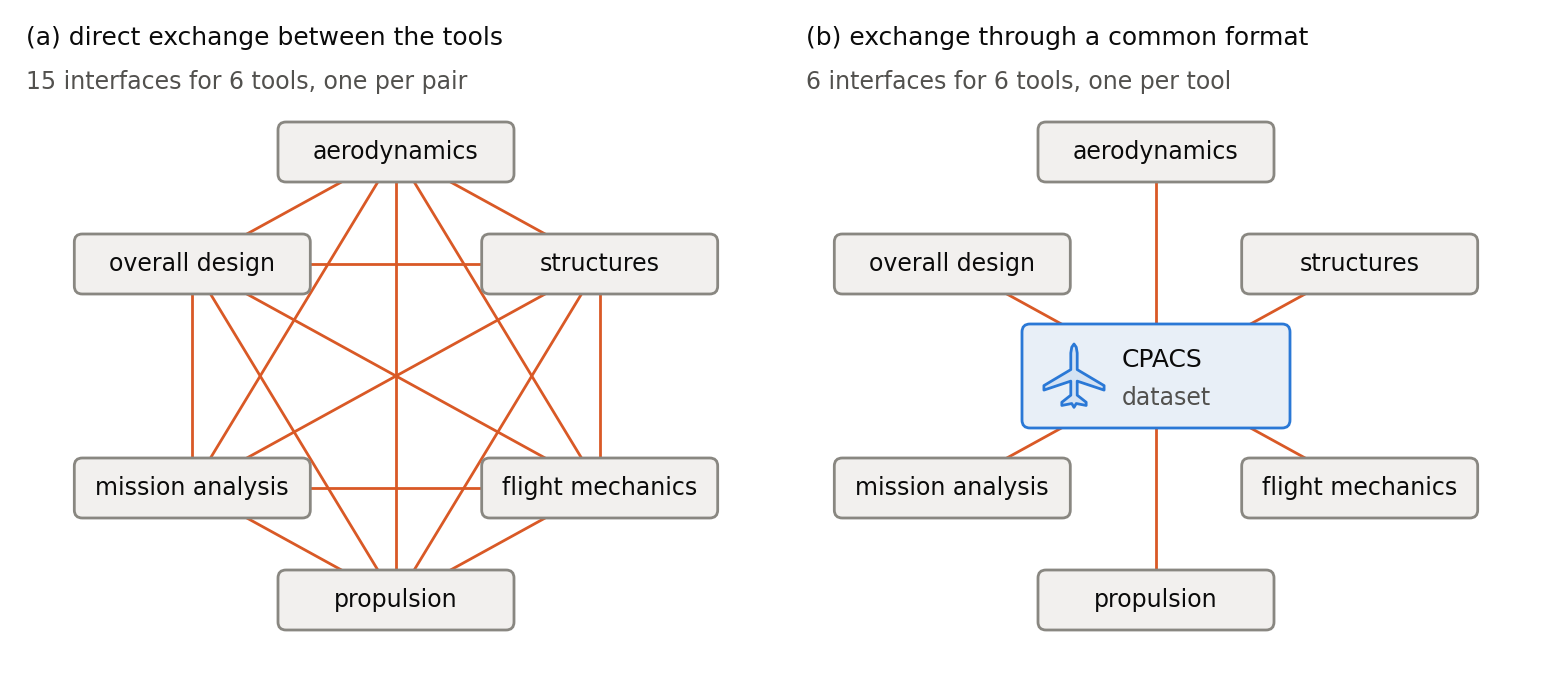
The figure compares the two for six tools. Exchanging data directly, they need 15 interfaces (a); through a common format, they need 6 (b). A seventh tool would add six interfaces in (a), but only one in (b).
A dataset
A CPACS dataset is an XML file with any name, e.g. aircraft.xml. It consists of nested elements, such as <wing>, which hold values or further elements, and of attributes, such as @uID, which add information to an element. The skeleton of a dataset with a single wing reads:
<cpacs xmlns:xsi="http://www.w3.org/2001/XMLSchema-instance"
xsi:noNamespaceSchemaLocation="cpacs_schema.xsd">
<header>
<name>Short-range airliner</name>
<version>1.0.0</version>
<versionInfos>
<versionInfo version="1.0.0">
<creator>Aircraft design team</creator>
<timestamp>2026-10-01T12:00:00</timestamp>
<description>Initial sizing</description>
<cpacsVersion>3.5</cpacsVersion>
</versionInfo>
</versionInfos>
</header>
<vehicles>
<aircraft>
<model uID="aircraft">
<name>Short-range airliner</name>
<wings>
<wing uID="mainWing" symmetry="x-z-plane">
<name>Main wing</name>
...
</wing>
</wings>
</model>
</aircraft>
<profiles>
...
</profiles>
</vehicles>
</cpacs> The <header> identifies the dataset and records its versions (section 3); <vehicles> holds the aircraft with its components, here the main wing, and the library of shared parts such as airfoils. Section 2 explains this structure.
The attribute @xsi:noNamespaceSchemaLocation of the root element names the schema file, so that an XML processor finds it without further input; a relative path is resolved against the directory of the dataset.
Schema and validation
The XML schema cpacs_schema.xsd serves two purposes. It defines the structure of a dataset: the elements, their order and their number, the attributes, and the data type of every value. And it carries the documentation of each element and each type, from which these pages are generated. An XML processor reads the schema and the dataset and checks that the dataset follows the schema (validation).
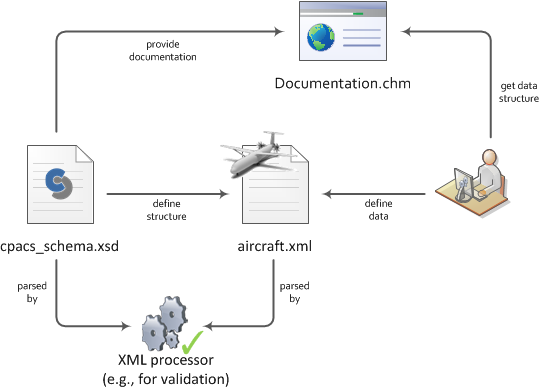
The figure shows how the parts relate: the schema defines the structure of the dataset, tools and users write and read the data, and the documentation generated from the schema tells them what the data means. The validation checks the structure and the data types, that every UID is unique and that every reference names an existing UID. It does not check whether the values are plausible, whether they are given in the right units (section 5), or whether a reference points to an element of the right kind (section 6.1). A dataset that is split into several files is validated only after its files have been merged (section 11).
How to read and write a dataset, by hand with an editor, interactively in the TiGL Creator or automated with libraries such as TiXI and TiGL, is described in section 3.
Reading this documentation
Each type of the schema has a page of its own. It opens with a one-line summary, followed by the explanation of the type, with figures and examples where they help. The table of child elements lists for each element its type, which links to the page of that type, its constraints, its default value, and its occurrence: [1..1] for a required element, [0..1] for an optional one, and [1..∞] for an element that occurs once or more. Attributes are listed the same way. Under "Used by", a page lists all places of the dataset where the type occurs, and "Show in tree" shows the type in the hierarchy below the root element.
Where to go next
The following sections define what applies to every type of the schema; the pages of the individual types build on them without repeating them. Everyone who writes or reads CPACS data needs the data structure (section 2), reading and writing a dataset (section 3), the CPACS coordinate system and the local coordinate systems of components (sections 4.1 and 4.3), the units (section 5) and UIDs and references (section 6). The other sections are needed when working with the respective data: the aerodynamic coordinate system (section 4.2) for aerodynamic coefficients, symmetry (section 7) for mirrored components, vectors and arrays (section 8) for maps and other large sets of numbers, control parameters (section 9) for control surfaces and landing gears, the atmosphere (section 10) for flight conditions, and datasets split into several files (section 11). For a first dataset, continue with sections 2 and 3 and then with a component, e.g. the wing (wingType) or the fuselage (fuselageType).
CPACS is an open source project published by the German Aerospace Center (DLR). The schema, the examples and the release history are available in the CPACS repository on GitHub; further information is given on www.cpacs.de.