8.1. Symmetric components
Many components are symmetric, e.g. the left and the right side of a wing. Instead of storing both sides, such a component can be described once and mirrored with the symmetry attribute:
<wing uID="wing" symmetry="x-z-plane">
    ...
</wing>The attribute can take the following values; the documentation of each element states which of them are allowed:
| Value | Meaning |
x-y-plane, x-z-plane, y-z-plane | The component is mirrored at this plane of the CPACS coordinate system, i.e. at a plane through its origin. Mirroring creates a second component: the component described by the data (defined side) is complemented by its mirror image (mirrored side), which is a component of its own. |
inherit | The component takes the symmetry of its parent component (<parentUID>); a component without parent is not mirrored. This is the default, i.e. it also applies if the attribute is not set. |
none | The component is not mirrored, even if its parent component is. |
Components with a symmetry attribute are e.g. wings, fuselages, ducts, engines, engine pylons, fuel tanks, landing gears, rotors and generic geometric components.
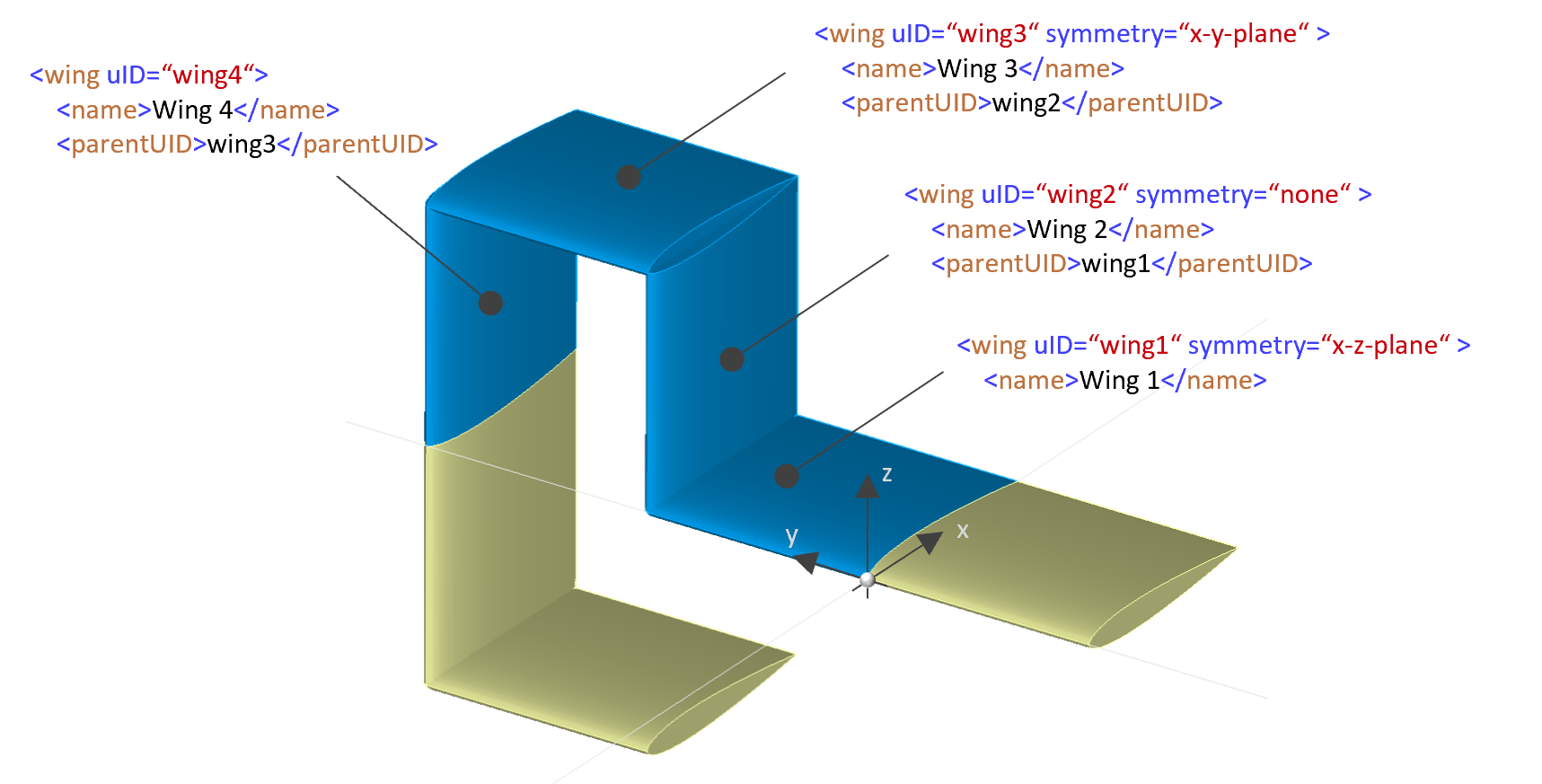
Because the symmetry is inherited along the <parentUID> hierarchy, it can be passed on, switched off and set anew. The following example shows four wings that form a box:
-
wing1is mirrored at the x-z plane. -
wing2haswing1as parent, but switches the symmetry off. It therefore exists only once. -
wing3haswing2as parent and sets a new symmetry at the x-y plane. -
wing4haswing3as parent and nosymmetryattribute. It inherits the symmetry ofwing3and is mirrored at the x-y plane as well.
<wings>
    <wing uID="wing1" symmetry="x-z-plane">
        <name>Wing 1</name>
        ...
    </wing>
    <wing uID="wing2" symmetry="none">
        <name>Wing 2</name>
        <parentUID>wing1</parentUID>
        ...
    </wing>
    <wing uID="wing3" symmetry="x-y-plane">
        <name>Wing 3</name>
        <parentUID>wing2</parentUID>
        ...
    </wing>
    <wing uID="wing4">
        <name>Wing 4</name>
        <parentUID>wing3</parentUID>
        ...
    </wing>
</wings>8.2. References to symmetric components
Elements that reference a component by its uID (stringUIDBaseType, e.g. <parentUID>) refer to both components created by a symmetry, i.e. to the defined and the mirrored side. The symmetry attribute of the reference selects a single side instead:
| Value | Referenced part of the component |
def | defined side only |
symm | mirrored side only |
full | both sides, i.e. the defined and the mirrored component (default) |
The attribute is only used in references to components with a symmetry attribute.
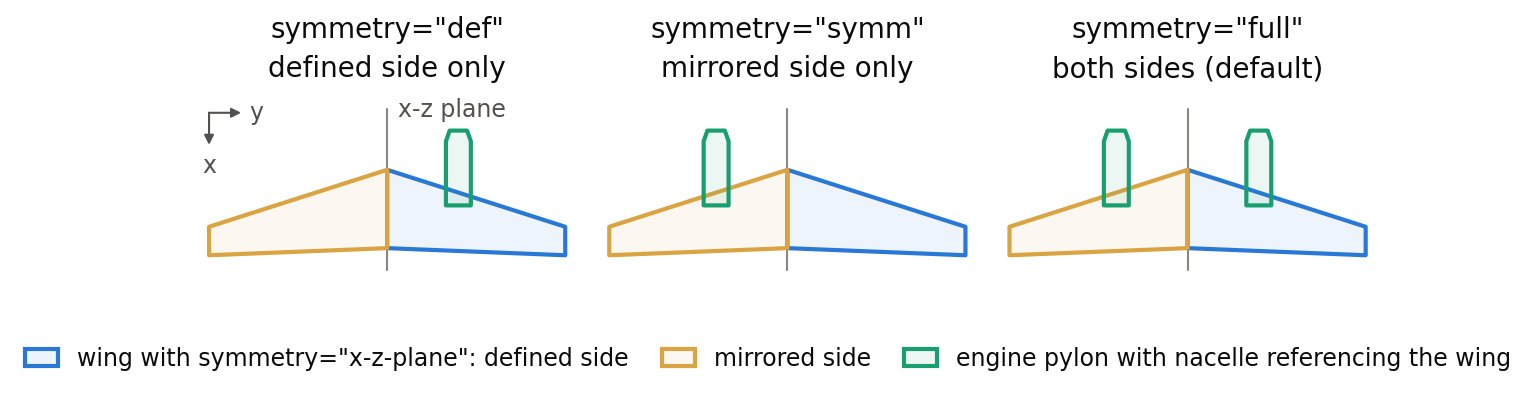
The figure shows an engine pylon whose <parentUID> references a wing mirrored at the x-z plane. With def, the pylon belongs to the defined side of the wing only, with symm to the mirrored side only, and with full to both sides.
<enginePylons>
    <enginePylon uID="pylon">
        <parentUID symmetry="symm">wing</parentUID>
        ...
    </enginePylon>
</enginePylons> Older datasets often append the side to the referenced uID instead, e.g. wing_symm for the mirrored side of the wing wing or engine1_def for the defined side of engine1. This is not intended and must not be used: the string does not match the uID of the referenced element. Reference the uID unchanged and select the side with the symmetry attribute, as in the example above.
<enginePylons>
    <enginePylon uID="pylon">
        <parentUID>wing_symm</parentUID>
        ...
    </enginePylon>
</enginePylons>