A dataset is plain text, so it can be read and written with any text editor. An editor with XML support makes this easier: it indents and folds the hierarchy and, depending on the editor, checks the dataset against the schema while it is written and suggests the elements that may follow. Examples are Visual Studio Code with an XML extension, Notepad++ with its XML Tools plugin, and XML Notepad.
Between editing by hand and the automated process chain described below lies the TiGL Creator, the graphical user interface of TiGL. It shows the geometry of a dataset in 3D next to its hierarchy, so that the effect of the data can be inspected directly, and selecting a component in one selects it in the other. It also creates new datasets from templates and changes components such as wings and fuselages through dialogs, e.g. their sweep or dihedral, and writes the result back as a CPACS dataset.
In a process chain, reading and writing is automated. A dataset passes through many tools, and each of them reads the part it needs in a pre-processing step and writes its results back in a post-processing step. These steps call libraries through their programming interfaces (APIs): TiXI for reading and writing the data, TiGL for the geometry, or general XML libraries such as libxml2 or lxml. Unlike the TiGL Creator, which is operated by hand, the libraries are used from within the program of the tool.
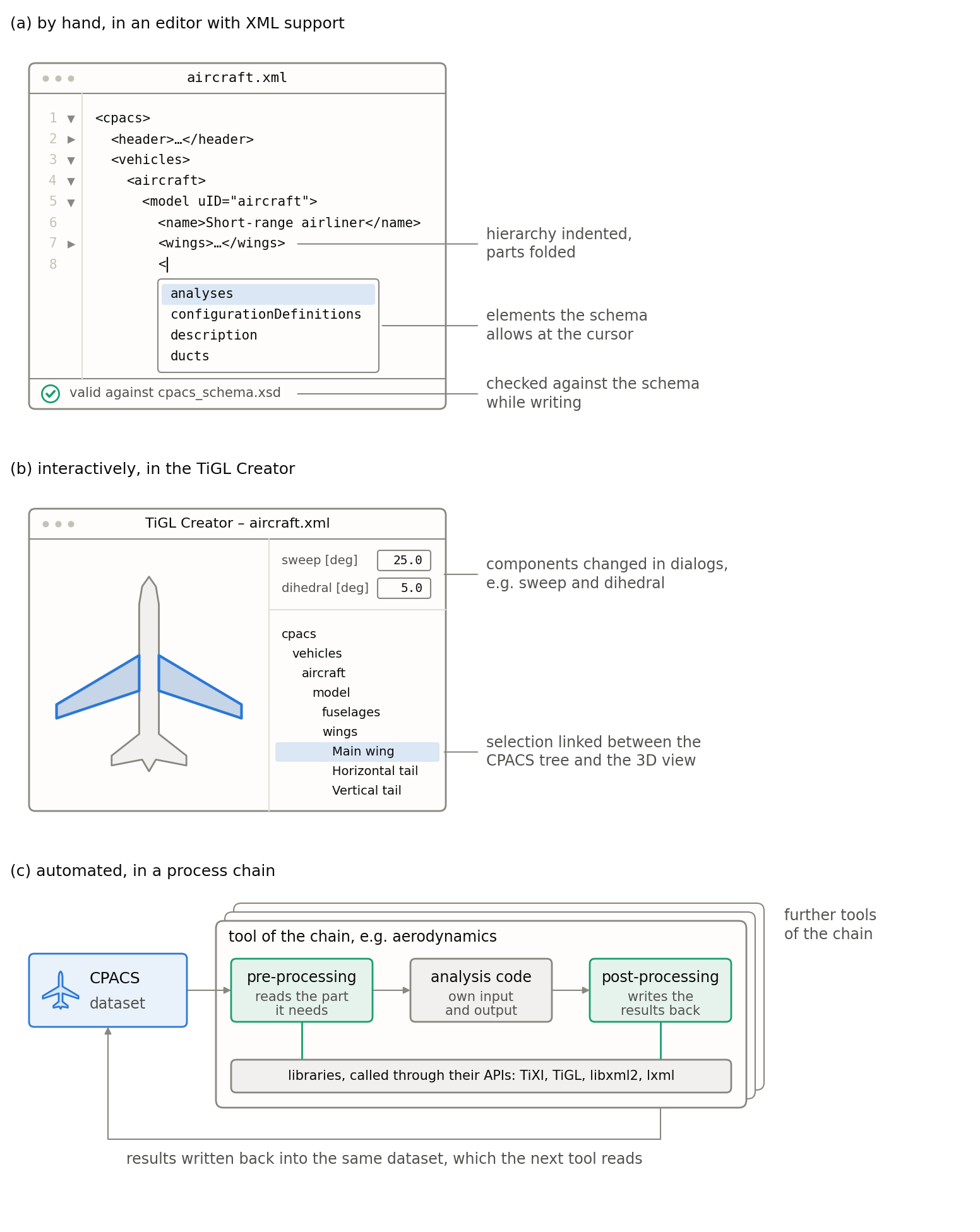
Figure (a) shows a dataset being written in an editor: the hierarchy is indented and partly folded, the editor suggests the elements the schema allows at the cursor, and the status bar reports that the dataset follows the schema. Figure (b) shows the TiGL Creator with the main wing selected: it is highlighted in the 3D view on the left and in the tree on the right, and its sweep and dihedral can be changed in the fields above the tree. Figure (c) shows one tool of a process chain: its pre-processing reads the part of the dataset it needs, the analysis code works with its own input and output, and the post-processing writes the results back into the same dataset, which the next tool then reads. Only pre- and post-processing call the libraries; the analysis code does not need to know CPACS.
Whether a dataset is edited by hand or by a tool, the following rules make sure that each tool understands what the others wrote and that no data gets lost on the way. They apply to every element of the schema, independently of the language or library a tool uses.
Structure and values
-
The order of child elements matters where a type defines them as a sequence, and is free where it defines them as
all. The table of child elements on each type page shows which applies. A tool writes the elements of a sequence in the order of the table, and reads the elements of anallgroup in any order. -
An optional element without a value is left out, not written empty. An empty element is not the same as a missing one, and for a number it is invalid.
-
Where an optional element or attribute is missing, its default value applies, e.g.
absLocalfortranslation/@refTypeorinheritfor@symmetry. The documentation of each element states its default. A tool that reads the dataset uses the default; a tool that writes it may leave out values equal to their default. -
Numbers are written with a decimal point, optionally with an exponent, e.g.
0.25or2.5e-1;NaNandINFare valid values, in vectors and arrays onlyNaN. A decimal comma makes the dataset invalid. Boolean values aretrueorfalse(or1and0), and points in time follow ISO 8601, e.g.2026-10-01T14:30:00. Vectors and arrays are described in section 8, units in section 5. -
Elements whose documentation marks them as deprecated may still occur in older datasets and are understood when they are read, but they are no longer written.
Keeping the data of other tools
-
A tool that writes its results back into a dataset keeps everything else unchanged, including elements it does not know or does not use. Otherwise the data of the tools before it would be lost for the tools after it. In practice, the results are therefore merged into the incoming dataset rather than the dataset being written anew; this is typically done with XSLT, which is beyond the scope of this documentation.
-
Data that the schema does not define belongs under
<toolspecific>, the only place of a dataset that takes elements of any kind (toolspecificType). Anywhere else, an unknown element makes the dataset invalid.
Recording changes
The <header> keeps the history of a dataset. Each <versionInfo> describes one version, identified by its @version according to Semantic Versioning, and header/version names the current one; it has to match the @version of one of the <versionInfo> elements. Each <versionInfo> also records in <cpacsVersion> the CPACS version that this version of the dataset follows, and the dataset is validated against the schema of the CPACS version of its current version.
-
A tool that changes the dataset records this in a
<logEntry>in the<changeLog>of the current version, with its name as<creator>, the time and a short description. A log entry is sufficient for a single change. -
A new
<versionInfo>with a higher@versionmarks a milestone of the design rather than the work of a single tool, e.g. when a design and analysis workflow has run through.header/versionthen names the new version.
<header>
    <name>Short-range airliner</name>
    <version>1.0.0</version>
    <versionInfos>
        <versionInfo version="1.0.0">
            <creator>Aircraft design team</creator>
            <timestamp>2026-10-01T12:00:00</timestamp>
            <description>Initial sizing</description>
            <cpacsVersion>3.5</cpacsVersion>
            <changeLog>
                <logEntry>
                    <description>Wing span increased to 34.1 m to meet the take-off field length</description>
                    <timestamp>2026-10-01T14:30:00</timestamp>
                    <creator>Wing sizing tool</creator>
                </logEntry>
            </changeLog>
        </versionInfo>
    </versionInfos>
</header>Common mistakes
The following mistakes occur most often in practice:
-
A decimal comma instead of a decimal point, or an empty element instead of a missing one (this section).
-
Expecting a component to follow the rotation or scaling of its parent: only the translation is passed on along
<parentUID>(section 4.3). -
Values in feet, knots or radians where the documentation states [m], [m/s] or [deg] (section 5).
-
Deriving the meaning of an element from its UID instead of its
<name>(section 6.1). -
Expecting a component to be mirrored at a plane through its parent: the symmetry planes always pass through the origin of the CPACS coordinate system (section 7.1).
-
Appending
_symmor_defto a referenced UID instead of setting@symmetryof the reference (section 7.2). -
Writing a dataset anew from the data a tool knows, which loses the data of all other tools (this section).